Discover how the latest Gemini API File Search updates enable multimodal RAG, custom metadata filtering, and page-level citations for high-performance AI applications.
The Evolution of Retrieval-Augmented Generation (RAG)
For developers building enterprise-grade AI, the challenge has always been balancing data complexity with retrieval accuracy. On May 5, 2026, Google significantly expanded its Gemini API File Search tool, transforming it from a text-only utility into a robust, native multimodal Retrieval-Augmented Generation (RAG) engine , .
This update is a major leap forward for developers who previously struggled with fragmented pipelines. By integrating advanced model architecture with granular data control, Google is effectively reducing the engineering overhead required to build sophisticated, production-ready AI systems , .
Why This Matters for Modern Developers
In previous iterations, RAG systems often required separate, complex pipelines to handle different data modalities like images, video, and text. This created significant latency and synchronization issues that hindered scalability .
The new Gemini API File Search streamlines this by managing the entire lifecycle of your data—ingestion, chunking, embedding, and indexing—within a single, unified framework , . This allows developers to focus on application logic rather than the underlying infrastructure of vector databases .
By automating these backend processes, Google ensures that the Gemini API File Search remains accessible to teams of all sizes. It removes the need for manual vector database management, which is often the primary bottleneck in AI deployment .
Multimodal Integration via Gemini Embedding 2
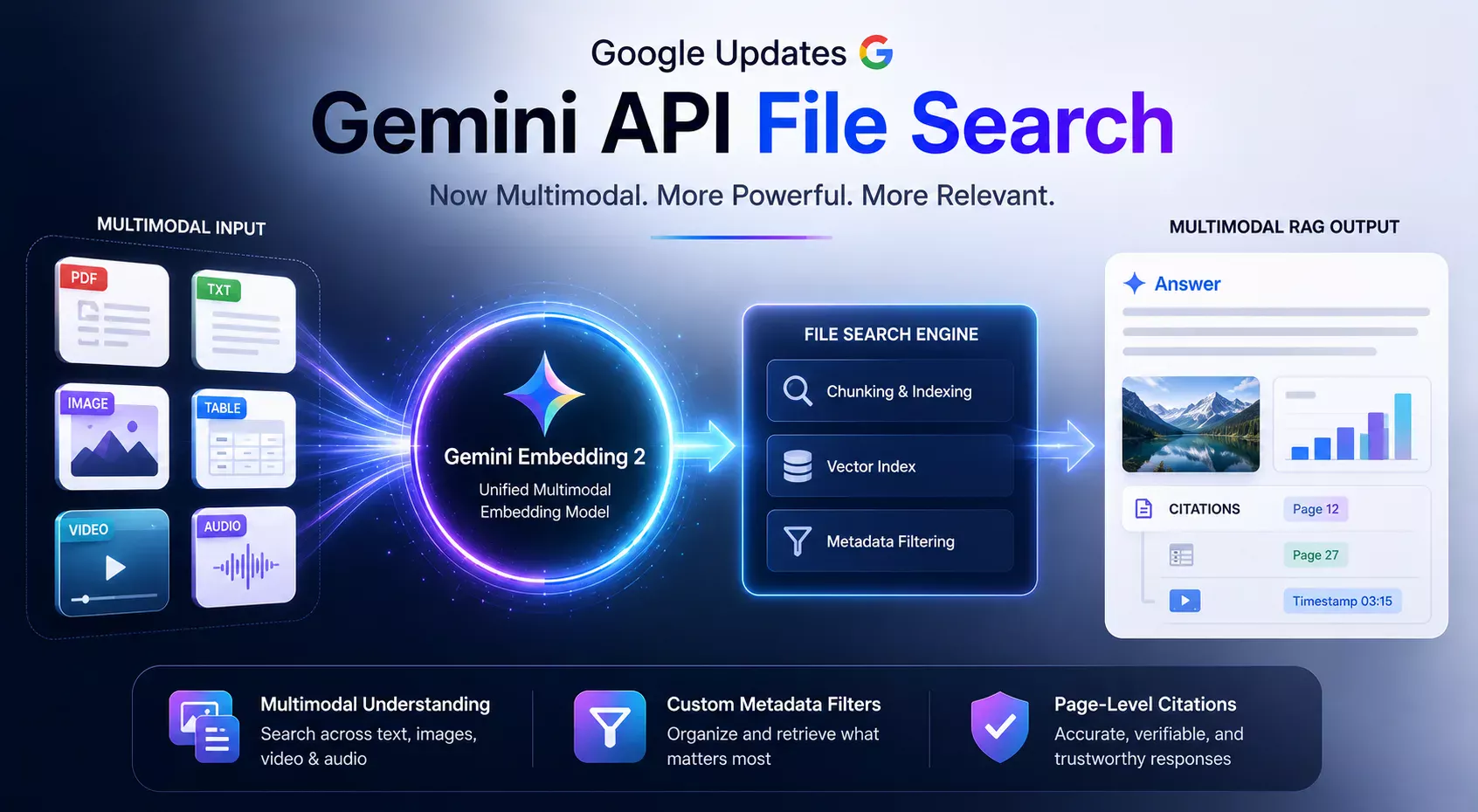
The cornerstone of this update is the deployment of Gemini Embedding 2, a unified multimodal model engineered to process text, images, video, and audio within a single, cohesive pipeline , . Unlike legacy systems that require separate models for different data modalities, this unified approach maps diverse assets into a single semantic space .
This architectural shift ensures that the contextual relationships between visual and textual data are preserved during the retrieval process . By utilizing a single vector space, the File Search tool can now execute cross-modal queries—for example, retrieving text documents based on visual cues or identifying relevant images through textual descriptions .
graph TD
 A[Input Data: Text, Image, Video, Audio] --> B[Gemini Embedding 2 Model]
 B --> C{Unified Semantic Space}
 C --> D[Vector Indexing]
 D --> E[Retrieval Engine]
 E --> F[Multimodal RAG Output]
Alt text: A flowchart showing how Gemini Embedding 2 processes various input types into a unified semantic space for multimodal RAG.
Enhanced Data Organization and Verification
Beyond multimodal capabilities, Google has introduced two critical features designed to improve the reliability and precision of RAG outputs. These tools address the “black box” nature of LLMs by providing structure and transparency , .
Custom Metadata Filtering
Developers can now implement custom metadata filters to inject structure into unstructured datasets . By tagging files with specific attributes—such as document type, creation date, or security clearance—developers can narrow the search scope before the model begins its reasoning process , .
This significantly improves retrieval speed and reduces the likelihood of the model hallucinating from irrelevant data segments . It is a critical requirement for enterprise environments where data governance is paramount.
Implementing Metadata Filters
To utilize metadata filtering, you must define your schema during the file ingestion phase. Below is a conceptual example of how you might structure your metadata request when uploading files to the API:
{
 "file_id": "doc_12345",
 "metadata": {
 "department": "engineering",
 "classification": "internal",
 "version": "2.0"
 }
}
Alt text: A JSON code block demonstrating how to attach custom metadata to a file for use in the Gemini API.
Page-Level Citations
To solve the transparency problem, the update introduces page-level citations , . When the system retrieves information to answer a query, it now provides specific references to the source file and the exact page or segment of origin .
This mechanism is essential for enterprise applications where auditability and factual verification are mandatory . Users can now verify the model’s output against the source material, drastically increasing user trust in the AI system .
Comparing Legacy vs. Modern RAG Workflows
| Feature | Legacy RAG | Modern Gemini API RAG |
|---|---|---|
| Data Modality | Text-only | Multimodal (Text, Image, Video, Audio) |
| Indexing | Manual/Custom | Automated by Gemini API |
| Verification | None | Page-Level Citations |
| Filtering | Basic Keyword | Advanced Metadata Filtering |
Building Scalable AI Agents
Transitioning to this new framework requires a shift in how you prepare your data. Focus on creating robust metadata schemas early in the development lifecycle to ensure your retrieval engine can effectively segment your knowledge base .
As the ecosystem matures, these tools are becoming the industry standard for building agents that interact with complex, multi-format knowledge bases . By leveraging these built-in features, you can reduce latency and improve the accuracy of your AI agents significantly , .
Best Practices for Deployment
When deploying the Gemini API File Search, ensure that your data ingestion pipeline is idempotent. This prevents duplicate indexing during system updates or re-uploads.
Furthermore, always validate your metadata tags against a strict schema. This ensures that the filtering logic remains consistent as your dataset grows in complexity and size.
Future-Proofing Your RAG Pipeline
The shift toward multimodal RAG is not just a trend; it is a fundamental change in how AI interacts with human knowledge. By adopting the Gemini API File Search early, developers position themselves to handle the next generation of data-rich applications.
As Google continues to iterate on the Gemini API, expect further enhancements in retrieval speed and cross-modal reasoning. Staying updated with these changes will be vital for maintaining a competitive edge in the AI development space.
FAQ
Q: Does Gemini Embedding 2 support audio files natively?
A: Yes, the unified semantic space created by Gemini Embedding 2 is designed to process text, images, video, and audio, allowing for cross-modal retrieval across all these formats , .
Q: How do page-level citations improve RAG reliability?
A: Page-level citations provide a direct link between the model’s output and the specific source document, allowing users to verify information against the original file and reducing the risk of misinformation , .
Q: Can I use custom metadata filters with existing datasets?
A: Yes, you can apply custom metadata to your existing files within the Gemini API File Search environment to better categorize and filter your data for more efficient retrieval , .
Q: Is the chunking process still automated?
A: Yes, the Gemini API File Search tool continues to manage the ingestion, chunking, embedding, and indexing of your files, abstracting these complex tasks away from the developer , .
Q: Why should I move from a custom vector database to Gemini File Search?
A: Gemini File Search reduces engineering overhead by automating the end-to-end RAG pipeline, providing native multimodal support, and ensuring high-accuracy citations out of the box , .